Create an account with Cookidoo®
A simple guide to getting an account set up with Cookidoo®.
Your very first step to getting set up with Cookidoo® is to create an account.
Follow the simple steps below to set up your account.
To begin, simply search 'Cookidoo' in your preferred web browser.
From the landing page on Cookidoo®, click 'Try it for free'.
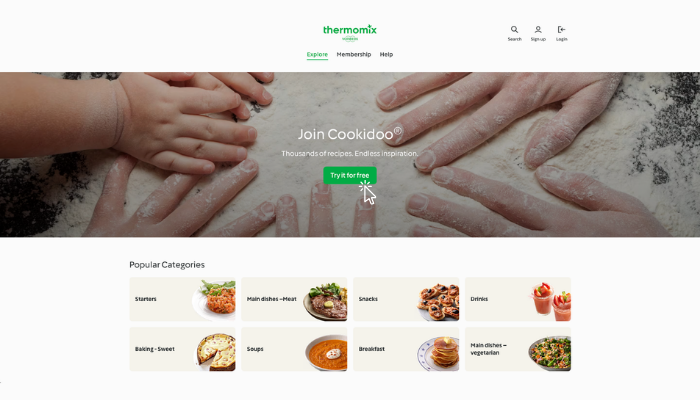
To join Cookidoo® :

Enter your email address and password.
Select your 'Country of Residence' from the drop down menu.
Check box to accept the Terms of Service as well as the Privacy Policy after you have read these. Click the links to open the 'Terms of Service' as well as the 'Privacy Policy'.
Then click 'Register'.

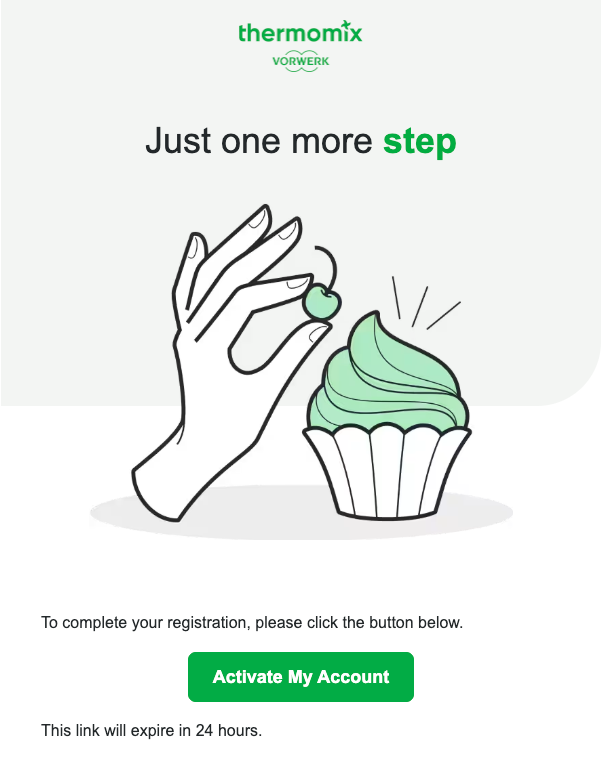
You will be sent an email to verify your account.
Open your email to find the email from Vorwerk -- 'Just One More Step to Verify Your Cookidoo® Account'.
Tip: Check your Junk/Spam folders if you are unable to locate the email.
Open the email and complete your registration by clicking 'Activate My Account'.
A web page will open confirming the set up of your account.

Congratulations! You're all set up!
To begin your Cookidoo® journey, click 'Start exploring'.
You will also receive a 'Welcome to Cookidoo®!' email from Vorwerk confirming your account has been successfully created.

Enjoy exploring Cookidoo®!
Bonus Tip:
Save the date of your membership renewal to your phone or add it to your planner. It is also handy to set a reminder of when your membership renewal is coming up.
To learn more, read a simple guide for 'Getting started with Cookidoo®'.

Comments